
- How to Log In to OReels UK
- Check Your Details Before Submitting
- Signing In to an Existing Account
- Reset a Forgotten OReels Password
- If the Password Reset Email Does Not Arrive
- If the Reset Link Does Not Work
- If You Cannot Remember or Access Your Registered Email
- OReels Login Not Working
- Incorrect Email or Password
- Login Form Not Loading or Responding
- Account Restriction Message
- OReels Login on a Mobile Browser
- Mobile Keyboard and Saved Password Problems
- When Login Works on One Device but Fails on Another
- Change Your Password After Logging In
- Keep Your OReels Login Details Secure
- Contact OReels About a Login Problem
- Information to Include in Your Support Request
How to Log In to OReels UK
To access your OReels account, open the official website, select Log in and enter your registered email address and password. If you already have an account, use your existing details to sign in.
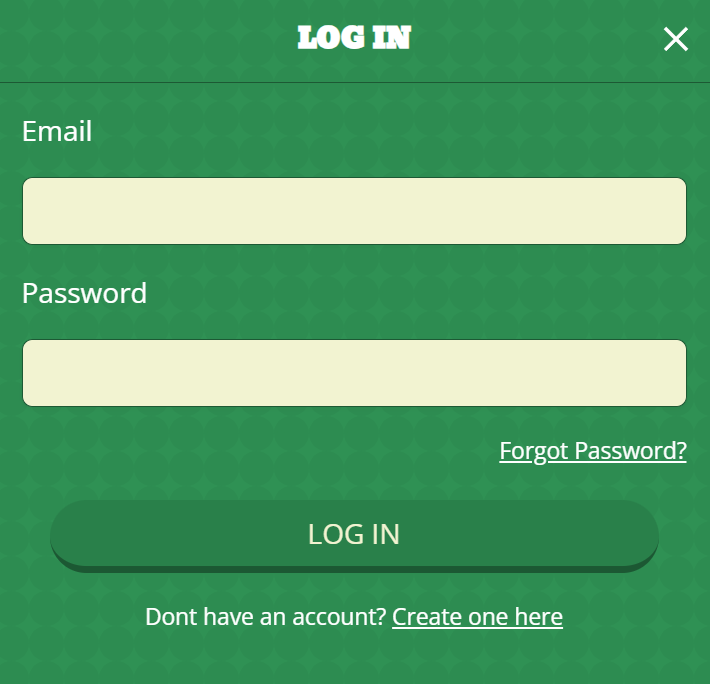
Follow these steps:
- Open the OReels website in your browser.
- Select Log in in the website navigation.
- Enter the email address associated with your account.
- Enter your password.
- Submit the form using the control displayed on screen.
If the form returns an error, read the message before trying again. Incorrect credentials, a page that does not respond and an account restriction need different solutions. Identifying which one you are dealing with avoids unnecessary password resets.
Check Your Details Before Submitting
Check the complete email address, including the spelling after the @ symbol. A small difference in the address can be easy to miss, particularly when you use several inboxes or your browser fills the field automatically.
For the password, check your keyboard settings and remove accidental spaces introduced when copying and pasting. If you have recently changed your password, make sure your password manager is inserting the new one. Manually entering the details can help you identify an outdated saved entry.
Signing In to an Existing Account
Recover your existing account if you have used OReels before. The casino allows one account per person, so registering again is not the way to resolve a login problem.
If you are unsure which details belong to your account, work through the recovery options below or contact support. The OReels FAQ also covers existing-account access.
Reset a Forgotten OReels Password
Use Forgot Password? from the sign-in page when you cannot remember your password. Recovery uses the email address registered to your account.
- Open the login form and select Forgot Password?.
- Enter your registered email address.
- Open the password recovery message in that inbox.
- Follow the reset link and complete the instructions.
- Return to the login form and sign in with your new password.
Choose a password that you do not use for other accounts. If you save it in a password manager, update the existing OReels entry rather than leaving several versions that could be confused later.
Keep the recovery email open until you have completed the process. Once the password has changed, use the new credentials for your next sign-in attempt.
If the Password Reset Email Does Not Arrive
First, make sure you are checking the same inbox as the address entered in the recovery form. If you manage several email accounts, check the full address rather than relying on the name displayed by your email app.
Look in junk or spam folders and search your mailbox for OReels. Check any filters that move incoming messages into separate folders. If you entered the wrong address, return to the recovery form and correct it.
If you still cannot complete recovery, contact support through Contact Us. Explain that the problem is receiving the reset email, so your request is distinct from an ordinary incorrect-password error.
If the Reset Link Does Not Work
Open the link directly from the recovery message. If you copy it into a browser, make sure you copy the complete address without adding spaces or omitting part of it.
If the page fails to load, check whether other websites open normally. You can also try opening the recovery message and its link in another browser. If the page displays an error, keep a note of the wording.
Return to Forgot Password? to start a fresh recovery request if necessary. When the same problem continues, tell support whether the link fails to open, the reset form fails to submit or the new password is rejected afterwards. Those are different points in the process and should be described separately.
If You Cannot Remember or Access Your Registered Email
Contact OReels support if you cannot remember your registered email address. If you know the address but can no longer access its inbox, explain that when requesting help.
Avoid cycling through unrelated addresses or opening another account. Give support the information you remember about your existing account and follow the instructions they provide. Do not send your password or the full password recovery link in a message.
OReels Login Not Working
Start with what happens on screen. A rejected password means the form has responded, while a blank or unresponsive form points to a different problem. An account restriction message needs support assistance rather than repeated changes to your credentials.
Use this table to choose your next action:
| What happens | First action | Next step if it continues |
|---|---|---|
| Your email or password is rejected | Check both fields and any saved credentials | Use Forgot Password? if you cannot supply the correct password |
| You cannot see a recovery email | Check the registered inbox and junk folders | Contact support about the recovery message |
| The recovery link fails | Open the complete link and check your connection | Start recovery again or report the error |
| The login form does not load or respond | Reopen the page and check your browser | Try another browser, then report the problem |
| An account restriction message appears | Read and record the message | Contact support |
| You cannot remember your registered email | Gather the account details you do remember | Contact support for assistance |
Change one thing at a time when troubleshooting. For example, check the credentials before switching browsers. This makes it easier to tell which action helped and gives you a clearer explanation if you need assistance.
Incorrect Email or Password
Recheck the email address and password together. A correct password paired with the wrong email address will still prevent access. Pay particular attention to saved entries if you have several accounts stored in your browser or password manager.
After resetting your password, enter the new one manually for the next attempt. If that works, replace the old saved password. Otherwise, autofill may keep inserting the same incorrect details on future visits.
If you are confident that you are using the intended email address but cannot remember the password, move to recovery rather than continuing to guess.
Login Form Not Loading or Responding
Check your connection by opening another website. If other pages also fail, resolve the connection problem before changing account details.
If the issue affects only the OReels page, close it and reopen the homepage. Check that your browser is up to date, then try another browser if the form still does not respond. On a phone, closing unnecessary tabs can also make troubleshooting easier.
A form that will not open does not establish that your password is wrong. Focus first on getting the page to respond. If it continues to fail, report whether the screen is blank, a control does nothing or an error appears after submission.
Account Restriction Message
Contact support when the login message says your account is restricted. Keep the exact wording available so you can describe the issue accurately.
A password reset changes your credentials; it does not resolve every account access condition. Let support explain the next action for the message you have received, and continue using your existing account.
OReels Login on a Mobile Browser
Open the OReels website in your phone’s browser and use Log in to access your account. Keep your registered email and current password available, particularly when signing in on a device that does not hold your saved details.
If the on-screen keyboard covers part of the form, finish entering the field and dismiss the keyboard to review the remaining controls. Before submitting, check that the email and password fields contain the details you intended to enter.
The recovery instructions above also apply when you use the website on your phone. If you switch to your email app to open a reset message, complete the password change before returning to the original login attempt.
Mobile Keyboard and Saved Password Problems
Phone keyboards and autofill can make sign-in convenient, but check what they insert. Look for accidental spaces in the email address, unexpected keyboard changes and a saved password that predates your latest reset.
If autofill repeatedly supplies the wrong details, enter them manually. After a successful login, update the saved entry so that your next attempt uses the same credentials.
If your password contains characters that are awkward to type on a small keyboard, take time to check them. A password manager can reduce typing errors, provided the stored entry is current.
When Login Works on One Device but Fails on Another
Compare the details entered on both devices first. The device that fails may be using an older saved password or a different email address.
Next, check the affected device’s connection and browser. Update the browser if needed and try another browser to see whether the problem follows the device or the original browser.
If you contact support, explain that access works elsewhere. Include the affected device, browser and what happens when you attempt to sign in. This is more useful than reporting only that login does not work.
Change Your Password After Logging In
If you know your current password and want to replace it, change it from your account settings:
- Open Account after signing in.
- Select the settings icon in My Account.
- Choose Change Password.
- Enter your current password and your new password.
- Select Change Password to confirm.
This is separate from forgotten-password recovery. Use the account settings route while you can sign in; use Forgot Password? when you cannot remember the credentials needed to access those settings.
Update your password manager after the change. If you also have the old password saved on another device, replace that entry before your next login there.
Keep Your OReels Login Details Secure
Keep your credentials private and use your own account. Do not share access with another person, even if you trust them to use the account carefully.
A unique password reduces the risk associated with reusing credentials across websites. Protect the email account used for recovery as well, since access to that inbox is part of resetting your password.
On a shared device, sign out when you finish and avoid saving credentials in a browser profile that other people can open. Closing a tab should not be treated as a substitute for signing out.
If you suspect someone else has obtained your account information, change your password and inform OReels support. When sending a screenshot of an error, conceal passwords, recovery links and unrelated personal information.
Contact OReels About a Login Problem
Use the Contact Us page to reach OReels through email or live chat. Contact support when recovery does not resolve access, you cannot identify your registered email or an account restriction message appears.
Describe where the process stops. For example, say whether you cannot open the form, your credentials are rejected, the recovery email is missing or the reset link displays an error. This gives the support team a clear starting point.
Information to Include in Your Support Request
Prepare a brief account of the problem:
- The exact error message or what appears on screen.
- Whether you were attempting login, password recovery or a password change.
- The device and browser you were using.
- The approximate time the problem occurred.
- The checks you have already completed.
- Whether the same problem occurs on another device or browser.
Include a screenshot if it helps explain the issue, with sensitive information concealed. Never include your password. Keep any reply with your original request so that follow-up messages preserve the details of the problem and the actions already taken.
Open OReels Casino Login
Sign in to continue and access the current player offer.

Bonus Deals October 2026