
- OReels Casino Sign Up for UK Players
- How to Sign Up at OReels
- Where to Find the Join Button
- Review Your Details Before Submitting
- What to Prepare Before Registration
- Personal and Contact Details
- Account Credentials and Password Security
- Registration Conditions and Policy Acceptance
- Already Registered with OReels?
- Recover Your Existing Account
- Account Verification After Sign Up
- Proof of Identity and Address
- Prepare Clear Document Copies
- Follow Up on a Verification Request
- What to Do If OReels Sign Up Does Not Complete
- Existing Account or Duplicate Registration Message
- Incorrect Details or Outstanding Verification
- Active Time-Out or Self-Exclusion Settings
- Welcome Offer After Registration
- Qualifying for and Claiming the Free Spins
- First Steps Once Your Account Is Ready
- Review Contact and Marketing Preferences
- Set Deposit Limits and Session Reminders
- Keep Depositing Separate from Account Creation
- Get Help with OReels Registration
OReels Casino Sign Up for UK Players
To sign up at OReels, select Join, complete the registration prompts and create your account credentials. Have your name, current residential address and date of birth ready, then follow any instructions needed to verify your account. If you have registered with OReels before, recover your existing account rather than opening another.
How to Sign Up at OReels
OReels registration begins on the website. Enter your own details accurately, review them before submitting and use credentials that you can keep secure. Taking care over your personal information also helps when it is checked against your identity or address documents.
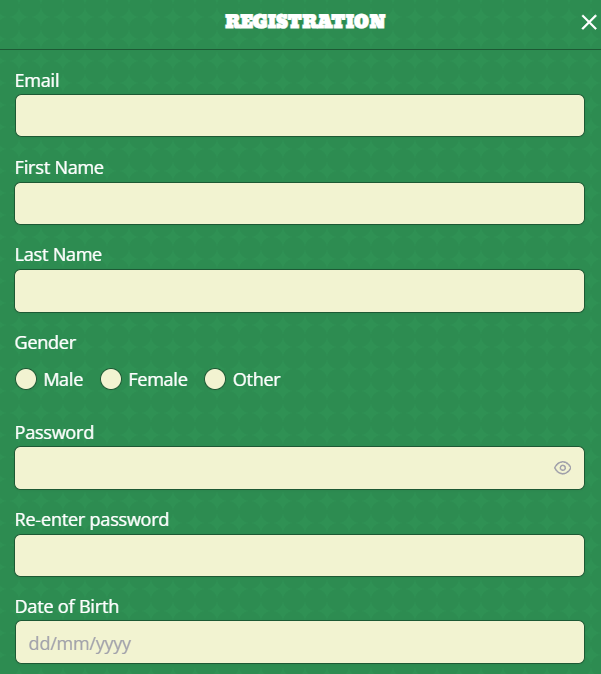
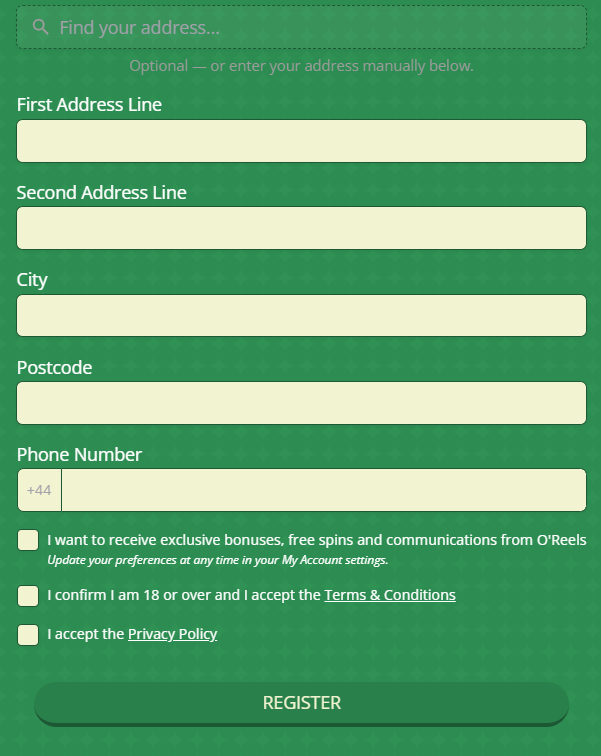
Follow these steps to create your account:
- Open the OReels website and select Join.
- Enter the personal and contact information requested during registration.
- Create your account credentials, including your username and password.
- Read the account terms and privacy information, then complete the required acceptance steps.
- Check your details and submit the registration.
- Follow any verification instructions you receive before proceeding with account activities that require completed checks.
Keep access to the email address associated with your account. You may need it for account correspondence, verification requests and password recovery later.
Where to Find the Join Button
The Join button is displayed in the website header alongside Log in. Choose Join when creating your first OReels account. Log in is the route for customers who already have one.
Start from the homepage whenever you need to return to registration. This gives you access to the current account-opening process and the website’s help pages without relying on an old promotional link.
Review Your Details Before Submitting
Check your name, address and date of birth before submitting the form. Use your full name as it appears on your identity documents, and enter your current residential address rather than a previous address or an address used only for correspondence.
Pay particular attention to your postcode, flat or house number and contact details. If your browser has filled in the form automatically, read each completed field. Saved information can contain an old address or an email account you no longer use.
If you notice a mistake while completing registration, correct it before continuing. For a mistake discovered after submission, contact support for help rather than trying to solve it by creating another account.
What to Prepare Before Registration
Preparing your information first makes it easier to complete OReels sign up without stopping to find details. Your personal information should reflect your current circumstances, while your account credentials should be separate from those used on other websites.
You do not need to treat every possible verification document as a registration field. Prepare the basic details first, then supply documents when requested.
| Information or item | What to prepare | Practical check |
|---|---|---|
| Name | Your full personal name | Match the spelling on your identity documents |
| Residential address | Your current address and postcode | Include the correct property and flat number where applicable |
| Date of birth | Your correct date of birth | Check each part before submitting |
| Contact information | An email address you can access and other requested contact details | Avoid using an old or mistyped email address |
| Account credentials | A username and a unique password | Keep the password private |
| Verification documents | Suitable identity and address evidence if requested | Use readable, current documents that meet the request |
Personal and Contact Details
Enter your own information throughout the registration process. Your account is for your personal use, so another person’s identity or contact details should not be used to complete it.
Choose an email address you regularly check. If OReels needs more information to complete verification, being able to read and respond to the request helps you take the next step. The same email address is also important if you later need to reset your password.
Your details must remain accurate after registration. If you move home, change your name or replace your email address or telephone number, arrange the necessary account update rather than leaving old information on the profile.
Account Credentials and Password Security
During account setup, you create a username and password. Choose a password that you do not use for your email account or other services, and store it somewhere secure.
Do not share your login details or allow someone else to use your account. On a shared device, avoid saving the password in a browser profile that other people can access, and log out when you have finished.
A username and the email address associated with your account serve different purposes. Keep a record of your account details so that you can recognise which information is being requested when signing in or recovering access.
Registration Conditions and Policy Acceptance
You must be at least 18 to open an OReels account. Registration is for personal use, and the one-account-per-person rule applies to both new and previous customers.
Read the Terms and Conditions and Privacy Policy before completing the required acceptance steps. These explain account use, verification and how personal information is handled.
Account policy acceptance and promotional email preferences have different purposes. Review each choice on its own terms rather than assuming that every option relates to creating the account.
Already Registered with OReels?
If you have held an OReels account before, use that account. The one-account rule still applies when you have forgotten your password, stopped using the account or lost track of the email address associated with it.
Opening a second account can create an avoidable registration problem. Start with account recovery, and ask support for assistance if you cannot restore access yourself.
Recover Your Existing Account
For a forgotten password, open the sign-in page and select Forgot Password?. Enter the email address registered to your account, then check that email account for the password-reset link. Follow the instructions in the message to choose a new password.
If the message does not appear in your inbox, check the junk or spam folder and confirm that you entered the correct email address. Use the reset instructions for your existing account rather than returning to Join.
If you cannot remember the registered email address or no longer have access to it, use Contact Us for assistance. Explain that you are trying to recover an earlier account so that support can address the access problem.
Account Verification After Sign Up
Registration supplies the information needed to create your account; verification checks that information. OReels may use electronic checks, request documents or use both methods. Checks can cover your age, identity and residential address, with further information requested where needed.
A document request does not mean that you should repeat registration. Read the request and provide the evidence specified for your existing account. OReels will explain what information is needed and how to supply it.
Proof of Identity and Address
Prepare documents that are valid, readable and relevant to the request. Identity evidence and address evidence have different purposes, so check which category you have been asked to provide.
| Verification purpose | Accepted examples | Important requirements |
|---|---|---|
| Identity and age | UK passport, UK driving licence, UK armed forces ID or other valid UK government-issued identification | Photographic identification must be unexpired and clearly legible |
| Identity and age using a non-UK passport | A valid passport issued by another country | The photograph and personal details must be clear |
| Residential address | Bank statement, council tax bill, government-issued letter or letterheaded NHS letter | The document must show your full name and residential address |
| Residential address using a utility bill | Landline, broadband, gas, water or electricity bill | Use a bill for a fixed-location service showing your name and address |
Unless another requirement is specified, proof of address must be dated within three months of receipt. Check the document date before submitting it, particularly if you keep older statements or bills in a saved folder.
The address on the document should correspond to your current account information. If you have recently moved or changed your name, explain the circumstances to support rather than supplying unrelated evidence.
Prepare Clear Document Copies
Document quality matters as much as the type of document. A suitable passport or bank statement can still require resubmission if the photograph is blurred, the edges are cropped or the relevant details cannot be read.
Before sending a copy, check that:
- All four corners and edges are visible.
- Your name and other required details are readable.
- Photographic identification is unexpired.
- Address evidence shows your full name, address and document date.
- The copy is complete and has not been altered.
When photographing a document, use even lighting and avoid glare across the text or photograph. Check the resulting image before submitting it. For proof of address, a clear original PDF may be suitable where it meets the request.
Do not edit a document to change or conceal the information needed for verification. Follow the specific submission instructions you receive.
Follow Up on a Verification Request
Read the whole request before responding. Sending identity evidence when address evidence is required can leave the original request outstanding, even if the document itself is valid.
Supply the requested information through the method OReels specifies. If you cannot provide a particular document, contact support to discuss the request and suitable alternatives rather than sending a series of unrelated files.
Some account functions may remain restricted while requested checks are outstanding. Complete the request before retrying an affected action. If you have already submitted the evidence and need help, tell support what was requested and when you supplied it, without assuming a fixed review time.
What to Do If OReels Sign Up Does Not Complete
The next action depends on what has stopped registration. An existing-account message requires account recovery, while an outstanding verification request requires the specified evidence. Repeatedly submitting the same information does not address either issue.
Read any message shown on screen and keep its wording available when seeking help. This gives support more useful information than a general description that registration is not working.
| Problem | First action | Next step |
|---|---|---|
| You have registered before | Stop the new registration attempt | Recover your existing account or contact support |
| A duplicate-account message appears | Check whether you already hold an OReels account | Ask support to help with the existing account |
| Personal details were entered incorrectly | Correct them if you are still completing the form | Contact support if the registration has already been submitted |
| Additional verification is requested | Read the request and prepare the specified evidence | Submit it using the instructions provided |
| An active time-out or self-exclusion affects registration | Leave the restriction in place | Contact support for account-specific guidance |
| Registration stops without a clear next step | Note the message and where the process stopped | Use email or live chat through Contact Us |
Existing Account or Duplicate Registration Message
A duplicate-registration problem may relate to an account you opened previously. Use the recovery process described above, even if you have not used that account for some time.
If you do not recognise the account issue, contact support and explain the message you received. Do not switch to another email address or another person’s details to continue registration.
Incorrect Details or Outstanding Verification
For an error spotted before submission, return to the relevant field and correct it. Check the rest of the form at the same time, especially if saved browser information was used.
After submission, ask support how to correct the account information. Creating another account with the corrected details can introduce a duplicate-account issue.
If verification is the outstanding step, focus on the requested evidence. Check that the document category, date and image quality meet the instructions before sending it.
Active Time-Out or Self-Exclusion Settings
An active time-out or self-exclusion within the Betable network can affect OReels registration. These settings should be handled through the relevant account and support process.
Do not try to bypass a restriction through a different email address or another registration. Contact support for guidance about the setting and your account. The Safer Gambling page explains the available account controls.
Welcome Offer After Registration
Creating an OReels account is the first step towards the welcome offer, but sign up alone does not complete qualification. The offer has a qualifying first deposit, a game-specific wagering requirement and a deadline.
For new players, the welcome offer provides 20 free spins on Big Bass Splash after the required deposit and wagering. Read the Welcome Offer terms before making a qualifying deposit so that you understand which play contributes.
Qualifying for and Claiming the Free Spins
To qualify, make your first deposit of at least £20 and wager £20 on Big Bass Splash. Wagering on other games does not count towards this offer.
Once the required wagering is complete, claim the 20 free spins through My Account. The wagering, claim and use of the free spins must be completed within seven days of your first deposit. Include all three actions when planning to use the offer; claiming the reward is not the final step.
Free-spin winnings are paid as cash with no additional wagering requirement. This applies to the winnings from the awarded spins and does not remove the initial £20 qualifying wagering.
The £20 deposit figure is a condition of this welcome offer. It should not be treated as the general minimum amount needed to register or as the minimum for every payment method.
First Steps Once Your Account Is Ready
Once your account is verified, you can make deposits, set preferences and use account features. Before moving on, check that your contact details are correct and review the controls available for managing your activity.
You can then decide whether to browse games, fund the account or take part in the welcome offer. Keep those decisions separate: account creation, depositing and promotional qualification each have their own steps.
Review Contact and Marketing Preferences
Keep your name, address, postcode, email address and telephone number current. If any of these change, arrange an update promptly so that account correspondence and future checks use the correct information.
Promotional email preferences can be adjusted through your account settings. You can opt out of promotional emails without treating that choice as an account-details change. Review the Privacy Policy if you want more information about how your details are used.
Set Deposit Limits and Session Reminders
The account’s Safer Gambling section provides gross deposit limits and reality checks. A gross deposit limit controls the amount of cash you can deposit during the applicable period. Withdrawals do not reduce the amount already counted towards that limit.
Reality checks provide on-screen reminders showing how long you have been logged into the website. They can help you keep track of session time.
Review these controls before making a deposit or starting a session. Choose settings that suit the amount of money and time you intend to spend, rather than basing them on a promotional qualification amount.
Keep Depositing Separate from Account Creation
When you choose to fund the account, select Deposit. You can access it directly or through the account area, then choose from the payment options presented and follow the payment instructions.
Check the amount and method before confirming the transaction. If you intend to use the welcome offer, consider its qualifying deposit and game requirements before making your first deposit.
A deposit is a separate transaction from registration. Completing one does not automatically complete verification or every requirement of an offer.
Get Help with OReels Registration
OReels provides email and live chat through its Contact Us page. Use these routes when you need help recovering an earlier account, correcting submitted details or responding to a registration or verification issue.
Give support a precise description of the problem. Include the stage you reached, the wording of any error and whether you previously held an account. For a verification query, identify the request you are responding to and the document category involved.
Do not send your password. If further identity information is needed, follow the instructions provided for your account.
For routine questions, the OReels FAQ also covers registration, password recovery, previous accounts and common sign-up problems.
Continue to OReels Casino Registration
Continue to account creation and unlock the latest available player reward.

Bonus Deals October 2026